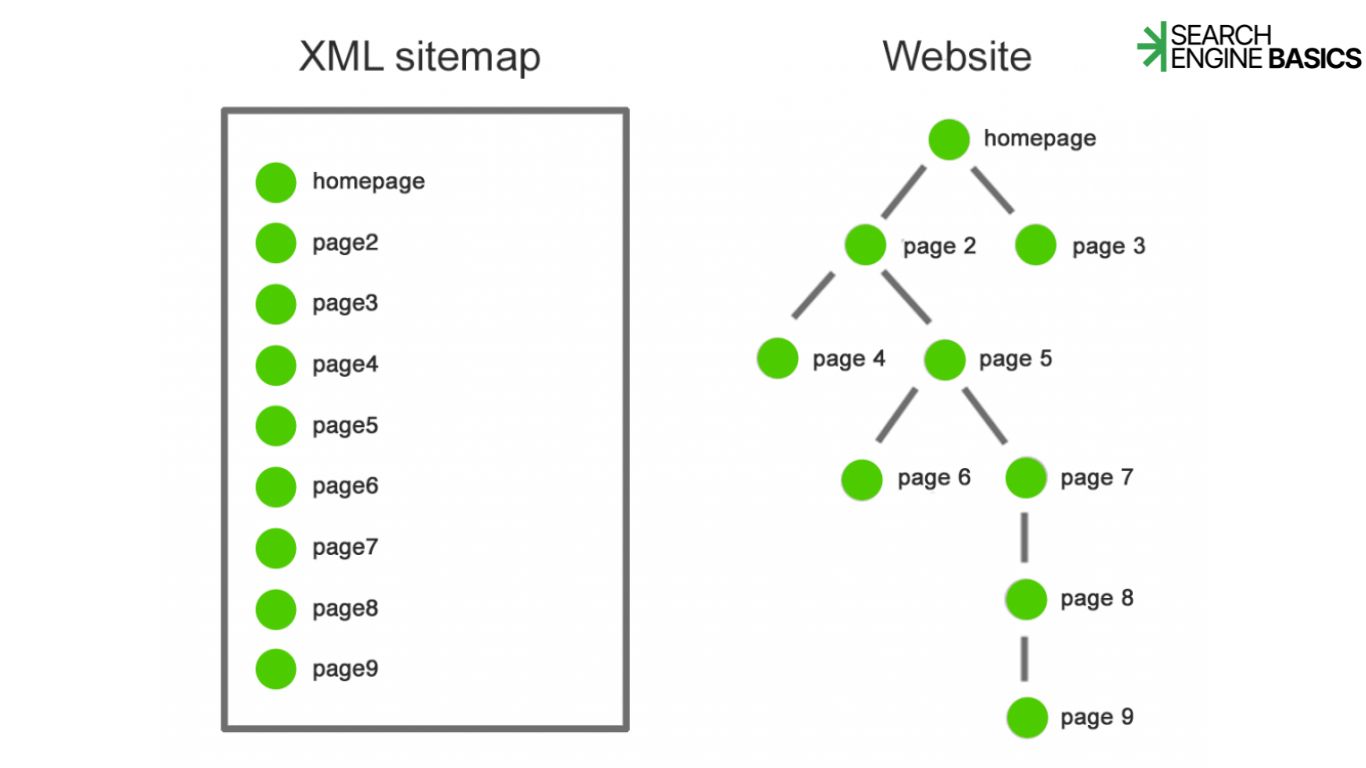

A sitemap is a file that lists the pages on your website so search engines can find them faster. Think of it as a table of contents you hand to Googlebot instead of making it guess what’s on your site by clicking around.
That’s the short answer. Now let’s get into why this small file matters more than most beginners assume, and where it fits into the bigger picture of how search engines work.
Sitemap vs. Robots.txt
New site owners often confuse a sitemap with a robots.txt file, but they do opposite jobs. A robots.txt file tells crawlers where not to go, blocking certain folders or pages from being crawled. A sitemap does the reverse: it points crawlers toward the pages you want indexed.
You can have one without the other. A small blog with twenty pages probably doesn’t need a sitemap at all, since Googlebot can find everything through normal links in a few visits. A 5,000 page ecommerce store, on the other hand, benefits enormously, because crawlers have limited time and attention for any given site, a concept search engines call crawl budget.
XML Sitemap vs. HTML Sitemap
There are two flavors, and they serve different audiences.
An XML sitemap is built for machines. It’s a plain text file, usually found at a URL like yoursite.com/sitemap.xml, listing every important page along with metadata like when it was last updated. Search engines read this file directly, often after you submit it through Google Search Console.
An HTML sitemap is built for people. It’s a regular page on your site, styled like any other, that lists out major sections so a human visitor can click around and find things. Some sites still use these for navigation, especially large directories or government sites, though they’ve become less common as site search and menus improved.
| Type | Built for | Typical location | Main job |
| XML sitemap | Search engines | /sitemap.xml | Helps crawlers discover and prioritize pages |
| HTML sitemap | Site visitors | A regular page, e.g. /sitemap | Helps humans navigate the site |
Why a Sitemap Actually Helps
Here’s the part that surprises a lot of beginners: submitting a sitemap doesn’t guarantee a page gets indexed, and it doesn’t boost your ranking. What it does is reduce friction.
Without a sitemap, Googlebot finds new pages by following links from pages it already knows about. If a page sits three or four clicks deep, or if it’s brand new and nothing links to it yet, that page might sit undiscovered for a while. A sitemap shortcuts that process by handing crawlers a direct list, which is especially useful for new sites with no link history, large sites with thousands of URLs, and pages that are isolated from the main navigation, like older archived content.
Google’s own Search Central documentation notes that sitemaps are particularly useful for sites that aren’t fully linked together internally, or that have a large amount of content recently added. That’s a fairly narrow claim, and it’s worth taking it at face value rather than assuming a sitemap is a magic fix for poor rankings. A sitemap helps with discovery, not relevance, and discovery is only the first stage. Crawling, indexing, and ranking are separate steps, and a sitemap only touches the first one.
Do I Need a Sitemap?
For most growing sites, yes, even if it’s a small one. Here’s a quick way to think about it:
- If your site has fewer than fifty pages and a clear internal linking structure, a sitemap is optional but still a good habit.
- If your site is large, frequently updated, or has pages that aren’t well linked internally, a sitemap is close to essential.
- If you run an ecommerce store with products that come and go, a sitemap helps crawlers catch new listings quickly, before the sale ends.
How Most Sites Get a Sitemap Without Building One
This isn’t a setup tutorial, but it’s worth knowing the general picture. Most modern content management systems, things like WordPress, Shopify, or Squarespace, generate an XML sitemap automatically the moment you publish a page, and update it again whenever you publish or remove content. Popular SEO plugins do the same. For most site owners, the file already exists somewhere on the domain; the main task is submitting that existing file to Google Search Console and Bing Webmaster Tools so the search engines know where to find it.
The Bigger Picture
A sitemap is one small piece of the crawling process, which itself is just the first of three stages search engines use to organize the web: crawling, indexing, and ranking. Understanding how that whole chain fits together makes a sitemap make a lot more sense, since it stops looking like a magic SEO trick and starts looking like what it actually is, a list that saves crawlers some time.
Frequently Asked Questions
1. Does a sitemap improve my Google ranking?
No. A sitemap helps search engines discover and crawl your pages faster, but ranking depends on separate signals like content relevance, page experience, and E-E-A-T.
2. Where do I find my sitemap.xml file? Try adding /sitemap.xml to your homepage URL. Most CMS platforms generate one automatically at that address or a similar one.
3. Can a sitemap get a page indexed instantly? No. Submitting a sitemap speeds up discovery, but indexing still depends on Google’s own systems, and there’s no published timeline that applies to every page.
4. Do small sites need a sitemap? Not strictly. If your site is small with strong internal links, crawlers will likely find everything on their own. A sitemap still doesn’t hurt to have.
Want to understand the step before this one? Read our pillar guide on Crawling to see how search engines discover pages in the first place.